NEW v1.0 NitroFTP + NitroBoost x32 Engine — Full 30-day free trial • Lifetime License for 49 USDT (TRC-20) with instant NFTP-LIFE key delivery! Buy with USDT TRC-20 →
⚡ Auto-resume • Multi-connection • Built for slow uplinks

Send 50 GB archives without ever starting over — even on a 10 Mbps uplink.

NitroFTP is the Windows client for big files and unstable connections: automatic resume after any network drop, up to 10 parallel connections on a single file, and saved passwords encrypted with Windows DPAPI. FTP, FTPS, SFTP, SCP, WebDAV, Amazon S3, Cloudflare R2, Azure Blob & SMB.

✔ 30-day free trial (100% unlocked)
✔ Windows 10 / 11 (64-bit) • 51.7 MB
✔ 49 USDT one-time payment (No subscription)
FeatureNitroFTPFileZillaWinSCP
Several connections on ONE file✔✘✘
Dynamic work-stealing between segments✔✘✘
Saved passwords encrypted (DPAPI)✔✘master password only
Price49 USDT onceFreeFree
Full comparison →
FTP & FTPS (Explicit / Implicit + TLS Reuse) SFTP & SCP (Parallel SSH2 Seek) WebDAV / WebDAVS Amazon S3 & Cloudflare R2 Wasabi / MinIO / OVH Object Storage Azure Blob Storage SMB / CIFS (Windows / NAS Network Shares) SOCKS5 & HTTP CONNECT Proxy
Familiar FileZilla-Style UI + NitroBoost Power

Built for daily productivity, engineered for raw transfer speed

Feel right at home with the Quickconnect bar, dual Local/Remote panes, Windows drag-and-drop, Site Manager, and CHMOD—supercharged with the live 32-segment map and real-time Nitro Monitor.

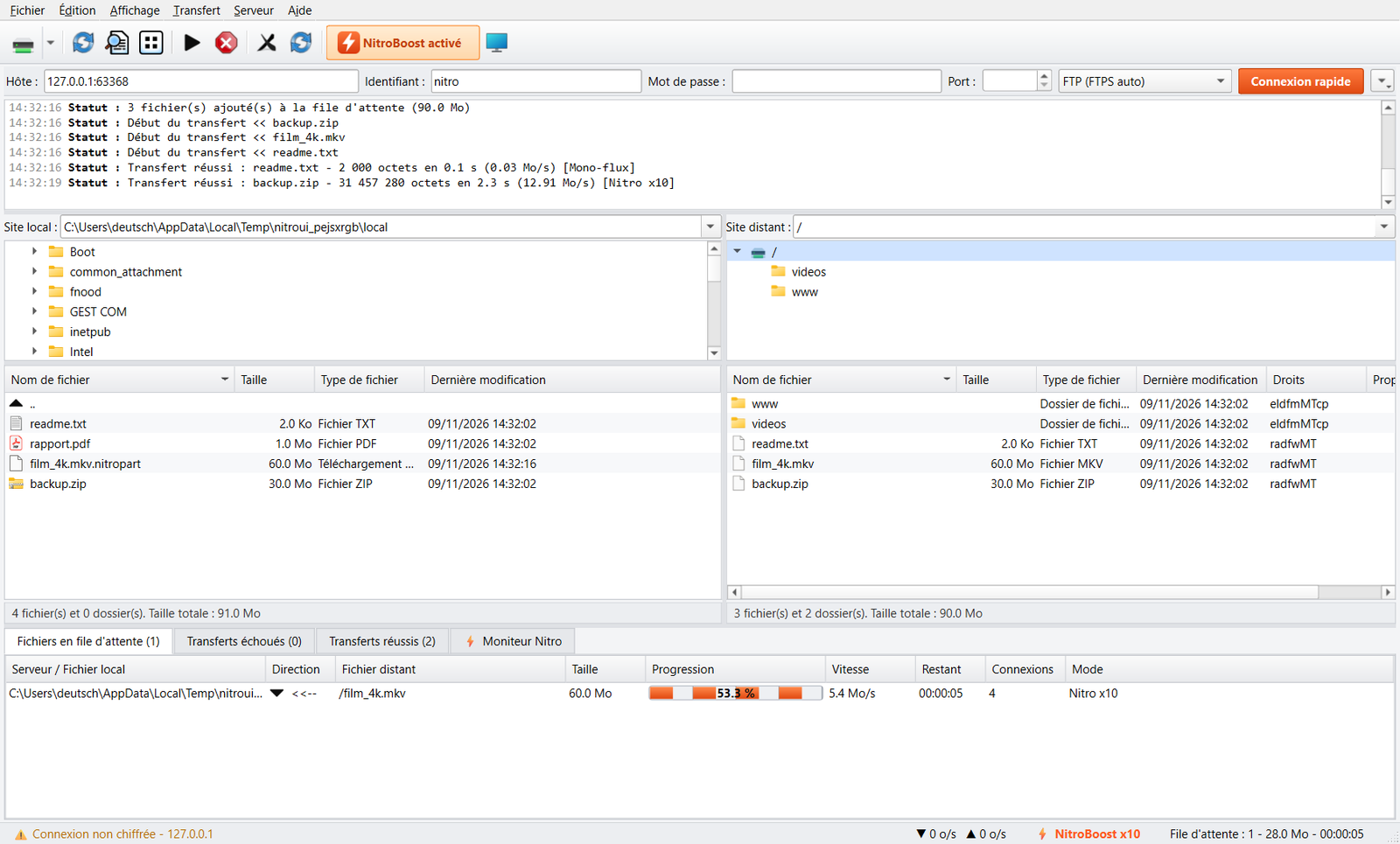
NitroFTP interface showing parallel segmented download with NitroBoost x10 segment map

⚡ Live Segment Map & .nitropart Files

Watch every parallel connection work simultaneously on different byte ranges of the same file. If your network drops, transfers resume at the exact byte offset segment by segment.

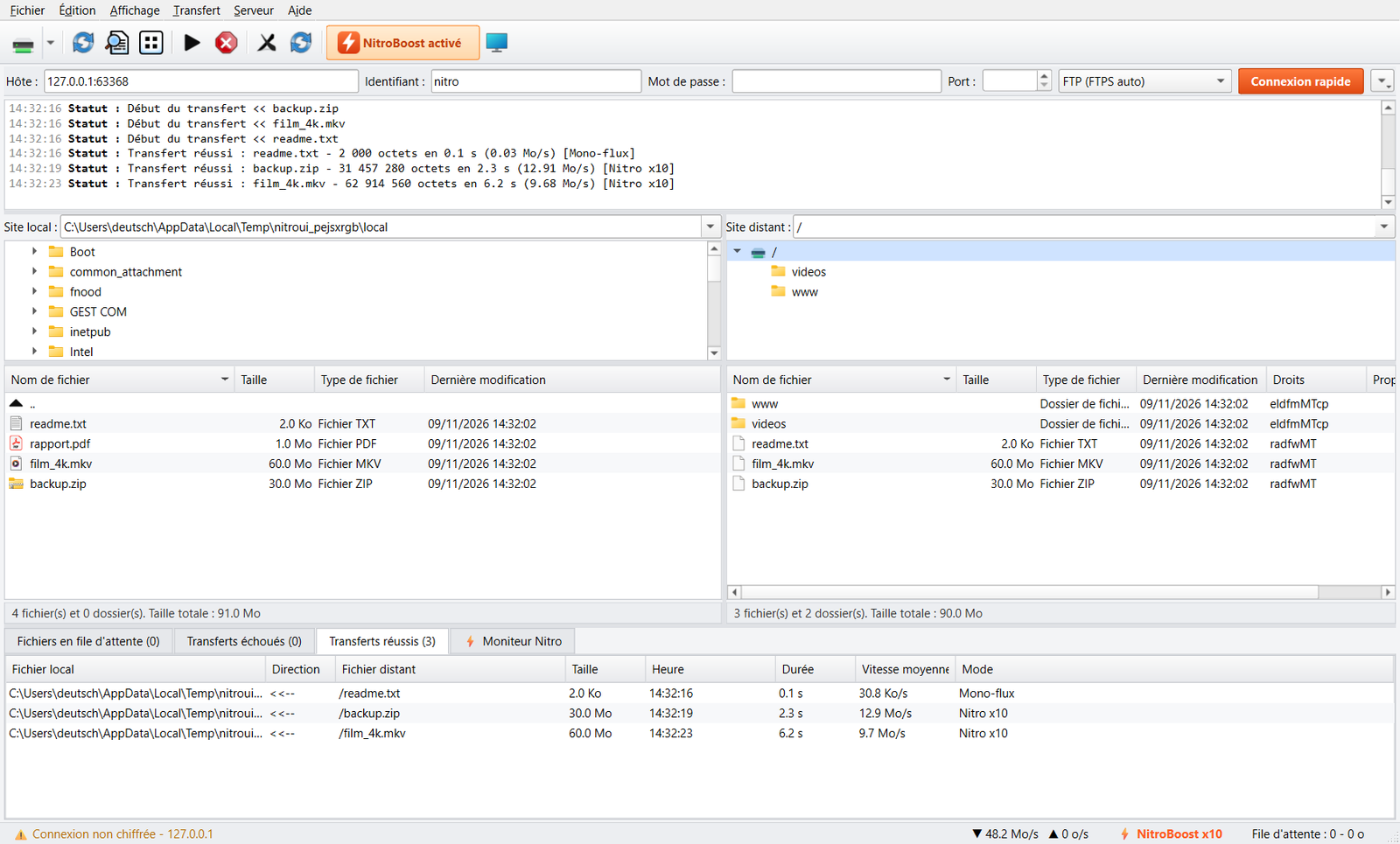
NitroFTP interface showing completed transfers at 48.2 MB/s in NitroBoost x10 mode

🚀 Unthrottled Speeds for Both Downloads & Uploads

See the immediate difference in the transfer log: jump from 1.9 MB/s on a single stream to 12.9 MB/s – 48.2 MB/s thanks to dynamic NitroBoost multi-segmentation.

Low-Level Network Architecture

Why NitroFTP outperforms legacy FTP & SFTP clients

Hosting providers, Seedboxes, and ISPs routinely throttle single TCP streams. NitroFTP breaks through per-stream limits without modifying your Windows registry.

🔀

Up to 32 Connections / File

Automatic parallel segmentation using REST + RETR/STOR on FTP/FTPS, parallel offset seek on SFTP, and multipart transfers on S3/Azure.

Parallel Download & Upload
🧠

Dynamic Work Stealing

No more waiting for one slow trailing connection at the end of a transfer: as soon as a fast worker finishes its chunk, it splits the slowest remaining segment in half.

Dynamic Work Stealing
📡

Pre-SYN TCP Window Scaling

SO_RCVBUF and SO_SNDBUF buffers are applied to every socket before the initial SYN packet to negotiate maximum TCP Window Scaling over high-latency links.

Zero System Registry Changes
📈

Adaptive Stream Scaling

NitroFTP spawns additional streams as long as real throughput grows by at least +5%, and automatically learns your server's 421 Too many connections ceiling.

Smart Auto-Tuning
🔒

TLS Session Reuse & DPAPI Security

Full TLS session resumption on FTPS data channels (required by vsftpd and FileZilla Server), hardware-backed Windows DPAPI password encryption, and anti-MITM TOFU fingerprints.

Military-Grade Cryptography
🩺

Built-in Nitro Diagnostic & Benchmark

One-click latency probing on ports 21/990/22/443, ISP DPI throttling detection, optimal MTU discovery, and live 1-stream vs N-stream speed benchmarking.

Server Menu > Nitro Diagnostic
Explore the full NitroBoost architecture in detail →
Real-Time Speed Calculator

How much time will you save with NitroFTP?

Adjust your file size and your current FileZilla single-stream speed to simulate NitroBoost parallel acceleration.

Time with FileZilla / Legacy client (Single stream)
2 h 50 min
Time with ⚡ NitroFTP (NitroBoost Enabled)
12 min 08 s
Estimated effective speed
35.2 MB/s
x14.1 faster
₮ Automated Web3 Crypto Checkout • Zero Subscription

One transparent lifetime price: 49 USDT

Test NitroFTP free for 30 days, then unlock your perpetual license using USDT (Tron TRC-20 network). Your Ed25519-signed NFTP-LIFE-... key is delivered automatically right after blockchain confirmation.

Full 30-Day Free Trial

Test the full power of NitroBoost on your own connection

0 USDT / 30 days
  • Official NitroFTP_Setup_v1.0.msi installer (Windows 10/11)
  • NitroBoost engine up to 32 connections/file unlocked
  • All 9 protocols included: FTP, FTPS, SFTP, SCP, WebDAV, S3, R2, Azure, SMB
  • Nitro Diagnostic & 1-stream vs N-stream Benchmark unlocked
  • No credit card or account registration required
⬇ Download 30-Day Trial (.MSI)
OFFICIAL LIFETIME LICENSE

NitroFTP Perpetual License

One-time payment in USDT (TRC-20) • Instant activation

49 USDT (TRC-20) 99 USDT
  • Lifetime License — No monthly or annual subscription
  • Cryptographic Ed25519 key (NFTP-LIFE-...) bound to your Machine ID (NFTP-HWID)
  • Permanently removes the 30-day evaluation limit
  • 24/7 automated delivery right after Tron TRC-20 TXID verification
  • Unrestricted segmented Downloads & Uploads up to 32 streams
  • All future updates and priority technical support included
₮ Buy Now with USDT (TRC-20) →
Frequently Asked Questions

Everything you need to know about NitroFTP & USDT Checkout

FileZilla opens only a single data connection per transferred file. If your remote server, Seedbox, or international routing limits each TCP stream to 2 MB/s, FileZilla will cap out at 2 MB/s even on a 1 Gbps Fiber line. NitroFTP automatically splits each large file into up to 32 simultaneous segments (using REST + RETR/STOR on FTP/FTPS, parallel offset seek on SFTP, or Multipart APIs on S3/Azure) and uses dynamic work stealing so all connections finish at the exact same moment.

Checkout takes less than 2 minutes: 1) Install NitroFTP and copy your Machine ID (formatted as NFTP-HWID-XXXX-XXXX-XXXX-XXXX inside the License window). 2) On our USDT Checkout page, paste your Machine ID and send 49 USDT on the Tron network (TRC-20) to the displayed address (from Binance, Bybit, OKX, Trust Wallet, TronLink, or Ledger). 3) Paste your transaction TXID: our server verifies the transaction on the Tron blockchain and immediately displays your Ed25519-signed NFTP-LIFE-... key.

No, zero global system or netsh changes are made. All TCP optimizations (pre-SYN SO_RCVBUF / SO_SNDBUF buffers and native SIO_KEEPALIVE_VALS keep-alive) are applied strictly to the network sockets created by NitroFTP.

Yes! In addition to classic protocols (FTP, Explicit/Implicit FTPS, SFTP, SCP), NitroFTP natively integrates WebDAV/WebDAVS, SMB/CIFS, Azure Blob Storage, and all S3-compatible object storage providers (Amazon S3, Cloudflare R2, MinIO, Wasabi, OVHcloud Object Storage) with high-speed parallel transfers.